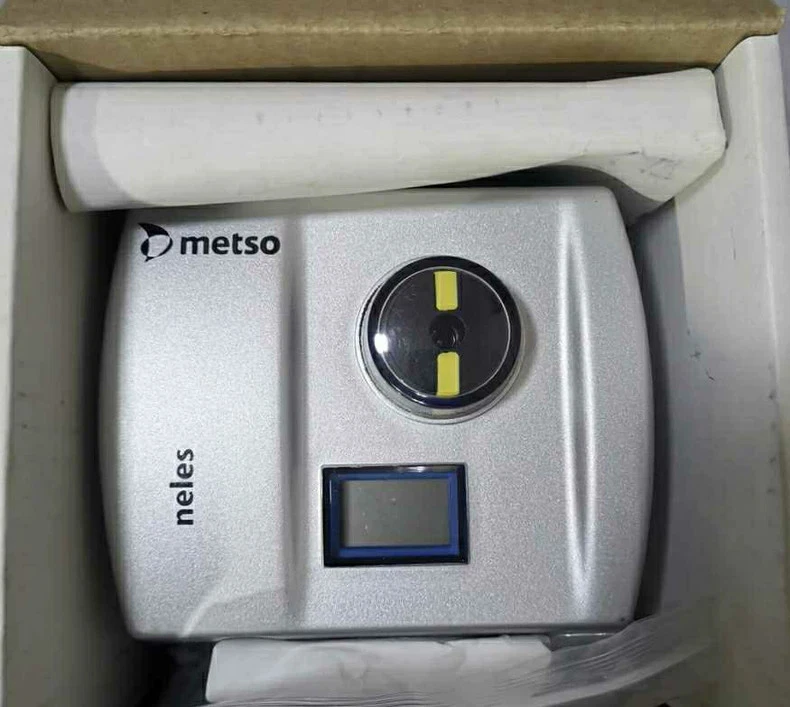
Troubleshooting Guide for VALMET ND9106HXT-A1-DS04 Smart Positioner: Solving Common Faults
The VALMET ND9106HXT-A1-DS04 is a versatile, high-performance smart positioner equipped with both HART and PROFIBUS PA communication (indicated by -A1) and a specific mounting kit (-DS04). Its robust design makes it a preferred choice for critical control loops. However, complex integration can lead to specific challenges. This guide provides a systematic troubleshooting methodology for maintenance teams facing operational issues with this model, aiming to minimize costly process downtime.
Critical Safety Reminder: Always adhere to plant safety protocols. Isolate the process, lock out/tag out energy sources, and vent air supply pressure before performing any hands-on work.
Chapter 1: Communication & Configuration Faults
Symptom Cluster: Positioner is non-responsive, shows communication errors on the local display, or is not recognized by the control system (DCS/PLC) or asset management software.
Problem 1.1: Complete Communication Failure (HART & PROFIBUS)
Checklist & Diagnosis:
Power & Loop Integrity: Verify that the 4-20mA loop is powered (18-30 V DC) and the current is ≥ 4 mA. Use a multimeter at the positioner terminals. For PROFIBUS, check that bus power is present.
Wiring & Polarity: For the analog/HART part (terminals 1+/2-), ensure correct polarity. For PROFIBUS PA (terminals 3/4/5), verify A/B line connections are not reversed and the shield is properly terminated at the segment coupler, not at the positioner.
PROFIBUS Address: The ND9106HXT-A1 must have a unique PROFIBUS node address set (via the local push buttons or DIP switches inside, depending on version). A duplicate or invalid address will cause bus conflicts.
GSD File: Ensure the correct, latest GSD (General Station Description) file for the VALMET ND9106HXT-A1 is installed in your DCS/PLC engineering station. An outdated file can prevent proper device recognition.
Solutions:
Step 1: Re-check all terminations for tightness.
Step 2: Use a HART communicator connected directly at the positioner terminals (in parallel) to rule out field wiring issues. If it communicates, the problem is in the panel or bus wiring.
Step 3: For PROFIBUS, use a bus analyzer or check the DCS for segment diagnostics. Look for missing terminators (required at both ends of the bus segment) or excessive cable length/stubs.
Problem 1.2: Device Responds to HART but Not on PROFIBUS (or vice versa)
Diagnosis: This points to a configuration or hardware issue specific to one communication channel. The -A1 module handles both protocols independently.
Solutions:
For PROFIBUS Failure: Enter the device configuration menu locally (using the push buttons). Navigate to the communication settings and verify the PROFIBUS baud rate matches the segment setting (typically 45.45 kbps for PA). Confirm the device is not set to "HART Only" mode.
For HART Failure on a PA Loop: On a pure PROFIBUS PA segment, the HART signal is suppressed. To use HART, you must typically connect the communicator at a point before the segment coupler or use a dedicated HART modem.
Chapter 2: Performance & Control Faults
Symptom Cluster: Valve movement is erratic, sluggish, inaccurate, or the positioner fails its auto-setup procedure.
Problem 2.1: Valve Sticks, Hunts, or Moves Erratically
Root Cause Analysis (Tiered Approach):
Air Supply (Most Common): Check the instrument air supply connected to the -A1 unit's inlet. It must be clean, dry, and lubricant-free. A clogged filter/regulator (often part of the supply kit) or moisture causes spool valve stiction. Verify pressure (typically 3-7 bar) meets actuator demand.
Mechanical Linkage (DS04 Specific): The -DS04 kit connects the positioner's feedback shaft to the actuator stem. If this linkage is loose, worn, or incorrectly adjusted, it introduces deadband and hysteresis, causing instability or inaccuracy.
Valve/Actuator Issues: High packing friction, a bent stem, or an undersized actuator creates excessive load.
Poor Tuning: After mechanical changes, the default tuning parameters may no longer be optimal.
Solutions:
Immediate Action: Drain air filters. Manually feel the actuator movement by temporarily disengaging the DS04 linkage. It should be smooth.
DS04 Adjustment: Loosen the linkage clamps. Ensure the positioner's feedback lever is at the mechanical midpoint when the valve is at 50%. Re-tighten and perform a full Auto Setup (initiated from local buttons or communicator). This procedure characterizes the valve and sets optimal tuning.
Advanced Tuning: If hunting persists post-setup, slightly increase the Damping parameter via the local interface.
Travel Too Small: The positioner did not detect sufficient stem movement. Check that the DS04 linkage is securely attached and the actuator travels its full range. Ensure no external mechanical stops are interfering.
Actuator Supply Low: The positioner's internal pilot cannot build sufficient pressure to move the valve. Increase the main air supply pressure. Also, check for a restricted air exhaust (silencer) on the positioner.
General: Always start setup with the input signal at 4 mA (0%) and ensure stable air supply.
Chapter 3: Hardware & Mechanical Faults
Symptom Cluster: Physical damage, air leaks, complete failure to move, or displayed sensor errors.
Problem 3.1: Air Leak from Positioner
Identification: Hissing sound, inability to hold pressure, actuator "creeping."
Likely Sources:
Exhaust Port (constant leak): Damaged diaphragm or sealing seat in the pneumatic relay.
Case Seal or Gauge Ports: Degraded O-rings.
Solution: Isolate air, depressurize, and apply a soapy water solution to locate the leak. Replacing internal seals or the I/P converter module may be required. For critical units, consider a factory exchange.
Problem 3.2: "Sensor Error" or "Feedback Fault" Display
Diagnosis: The non-contact magnetic angular sensor (connected to the DS04 feedback shaft) is faulty, disconnected, or encountering interference.
Solutions:
Check the wiring between the main board and the sensor.
Ensure the feedback shaft rotates freely and the magnet holder is intact.
A persistent error usually requires sensor or control board replacement.
Problem 3.3: No Pneumatic Output Despite Correct Input
Diagnosis: Blocked or failed I/P converter, seized spool valve, or internal electrical fault.
Troubleshooting Flow:
Use HART to monitor the "I/P Current" parameter. Does it change with the input signal? If not, the electronics are faulty.
If I/P current changes but no output, the I/P converter or pneumatic block is blocked/failed. Tap the unit lightly; internal stiction can sometimes be freed temporarily.
Perform a partial stroke test from the DCS. If the valve occasionally "jumps," it indicates a sticking pilot stage needing cleaning or replacement.
Chapter 4: Preventive Maintenance & Best Practices
Proactive care prevents most faults:
Quarterly: Inspect the DS04 linkage for tightness and corrosion. Check air filters.
Bi-Annually: Perform a manual valve stroke test and verify calibration by checking 0%, 50%, and 100% positions.
Annually: Execute a full Auto Setup during planned shutdowns to adapt to valve wear. Back up device configuration (using Valmet DTM or a HART communicator).
Continuous Monitoring: Leverage the PROFIBUS diagnostics and valve signature data (available via asset management software) to trend performance and predict failures.
By methodically working through this guide—starting with communication, then air supply, then mechanics—you can efficiently diagnose and resolve most issues with the VALMET ND9106HXT-A1-DS04. Its integrated diagnostics are your first and most powerful tool; use them to move from reactive repairs to predictive maintenance.
VALMET ND9103HX8T Smart Valve Positioner for Precise Industrial Control Introduction The VALMET ND9103HX8T valve positioner is a high-performance smart valve positioning solution designed for precise and stable control of industrial control valves. As part of the trusted Valmet ND9000 series, the ND9103HX8T combines advanced digital…
VALMET ND9106HNT Smart Valve Positioner for Reliable Industrial Control Introduction The VALMET ND9106HNT valve positioner is a high-performance smart positioning solution designed to meet the demanding requirements of modern industrial process control. As a key model within Valmet’s ND9000 series, the ND9106HNT combines precision control,…
VALMET ND9106HX8T Smart Valve Positioner for Advanced Process Control Introduction The VALMET ND9106HX8T valve positioner is a high-performance smart positioning device designed to deliver accurate, stable, and efficient valve control in modern industrial automation systems. As part of the well-established Valmet ND9000 series, the ND9106HX8T…